

In order to write successful content, ask yourself who you want to reach and what you want to achieve. Creating a persona helps you do this.
A persona is a fictional person
A persona is nothing more than a description of a fictional person. This fictional person has the same characteristics as your target audience.
The more realistic you make your personas, the more insight you will get into the questions and needs of the people you are trying to reach.
Create your persona first, content second
Creating a persona is a way to get to know the people that make up your target audience. When you get an idea of what it is they want and need, you understand why they come to your website. Then, you can start to think about the content that best serves these wants and needs.
Gather data and use facts
Avoid writing content based on assumptions. These may be wrong, leading to content that doesn’t land. Your work will have been for nothing.
That’s why gathering ‘real’ data is a must.
Below you’ll find a number of tips to help you along the way. The list is not complete, but it includes some suggestions you can try right away.
“Avoid writing content based on faulty assumptions.”
Tip 1: talk to your target audience
The best thing you can do is to open a conversation with your (potential) audience. Conduct interviews with any current and potential visitors of your website.
Watch and listen as your subjects visit the website in their context of use: a real-life setting such as their workplace. This article explains how to conduct such a contextual interview.
Ask about the specific moments in which they use the website. It’s best to set this up using the ‘critical incidents’ method.
Tip 2: Use a contact form to answer questions
Check regularly to see whether any questions have come in via your contact form. Be sure to check any other channels through which you might receive questions, as well. Find out who is asking and what information they need.
Tip 3: Keep up with feedback on your website
Read the comments that users leave on your website. If your website doesn’t allow visitors that option, consider adding it. If you don’t know how to do this yourself, ask your web developer to do it for you.
Tip 4: Analyse what is being said about you
Read all the reviews, comments and blogs that mention your website. You can do this by checking Referrals in Google Analytics. You can find referral reports under Acquisition. These will show you the websites your web traffic is coming from. Clicking on these domains will reveal the specific pages from which people have been referred.
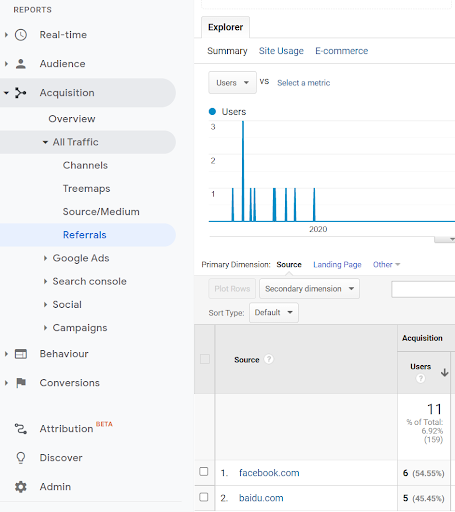
You can automatically track everything that is being said about you online using a program such as Awario or Mention. Or try Googling yourself in a private browser window.
Tip 5: Find out what your visitor is looking for
Be aware of the search terms that lead visitors to your website. What specific words are people typing into Google? Gain insight into these search terms by adding your website to Google Search Console.
Have a look at the search terms from your website’s search bar as well. You can do this by setting up Site Search.
Are visitors looking for any information, products or services that your website doesn’t offer yet? Or do they use different words for things that are on your website? These questions can lead to useful information for your persona.
“Doing discovery and research means you are better informed and better equipped to start tackling the content design problem”
Sarah Richards
Divide your audience into groups
Divide your visitors into different groups based on the data you have collected. How exactly does each group relate to your content?
For example:
- students, parents, teachers
- vendors, customers, influencers
- wholesalers, restaurant owners, festivalgoers
What do you know about your visitor? For example: instead of just calling them ‘student’, can you narrow it down to a first-year student, or a master’s student?
This lets you decide the type of content your audience needs, and how to write it.
Determine the characteristics of your target audience
Answer the following questions about your visitor based on the research you have done.
- Are there any key sentences or quotes you want them to remember?
- What level of experience and technical expertise do they possess?
- What can you say about their emotional state?
- What values are most important to them?
- What do you know about the technology (devices, channels, resolutions) they use?
- Are there any sociocultural aspects to keep in mind? What are the surroundings in which they use your website? How much time do they have?
- Demographics: how old is your visitor, what is their level of trust in the internet, do they have any disabilities?
- Job story. What is your visitor’s situation? What do they want to do? What is the desired result?
You can use the following template to write a job story for your persona.
When [situation],
I want [action]
so I can [specific result]
When I need to finance a project,
I want to learn about funding options available to me,
so I can request the information I need.
Persona templates and examples
Once you have collected all this information you can use a visual template to fill in the persona. Here’s an example:
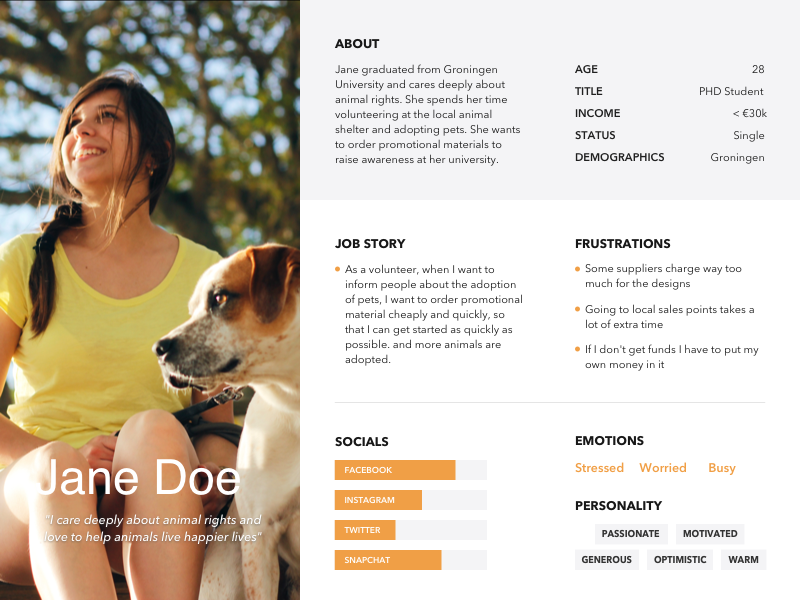
If you want to make a persona the quick and easy way, Hubspot has a handy tool for the job. Or you can download these templates to use in Sketch.
Use your persona while writing
Read the content you’ve written through the eyes of your persona. Did you answer all of their questions? Have you met their needs?
It’s useful to keep your personas close by. Hang them up near your desk and use them as a starting point for your content!
Want to know more?
Do you have any questions about collecting data or creating personas? Or would you prefer to outsource the job?
Get in touch with us via chat, email or phone. Let’s talk!
References
- Letting Go Of The Words, Janice Redish (2012)
- This is Marketing, Seth Godin (2018)
- Forms that Work, Caroline Jarrett & Garry Gaffney (2008)
- Content Design, Sarah Richards (2017)